G2G2 Moto Dash Pro
G2 Moto Dash Pro turns an iPhone on your handlebars into a riding dash.
WHAT IT SHOWS
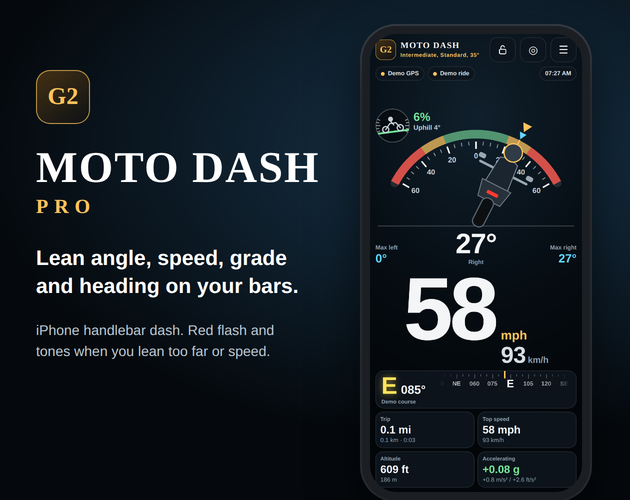
• Lean angle on a big rear-view gauge, with max left and max right
• GPS speed in mph and km/h (pick which one is big)
• Hill grade dial in % and degrees, uphill or downhill
• Heading from GPS course, big cardinal letters (N, SSE, WNW)
• Trip distance, ride time, top speed, altitude, accel and braking in g
ALARMS SO YOU DON'T LOOK DOWN
• Pick your skill (beginner, intermediate, expert) and bike (scooter, cruiser, standard, sport). Lean past your limit and the whole screen flashes red with fast high beeps.
• Set a speed alert, like 50 km/h / 31 mph for a new rider, and get two low beeps each time you cross it.
• Tones play through a Bluetooth helmet headset.
HOW LEAN IS MEASURED
A phone accelerometer reads almost zero lean in a steady turn. Moto Dash blends the gyro with GPS turn physics so the number holds up mid corner. Max lean only records above 7 mph / 11 km/h, so the side stand never counts.
SETUP
1. Mount the phone upright facing you, or flat on a tank bag with the top forward.
2. Tap Start and allow Motion and Location.
3. Stand the bike upright on level ground and tap Set upright.
4. Pick skill and bike in the menu, turn on ride lock, ride.
Try the demo ride first to see it move at your desk.
Everything runs on your phone. No account, no data sent anywhere.
SAFETY
Set up before you ride. Don't touch the phone while moving. This is a riding aid for practice and curiosity, not a certified instrument. Ride within your skill, the road and the law.
Made by G2G Simulations in Siquijor, Philippines.
Leave a comment
Log in with itch.io to leave a comment.